> ## Documentation Index
> Fetch the complete documentation index at: https://docs.getclave.com/llms.txt
> Use this file to discover all available pages before exploring further.
# Sending/Withdrawing Token via Clave
> A guide for sending tokens with Clave, using nicknames.
The Easiest Way to Send Tokens, Crypto, and Stablecoins: Clave. Discover how effortlessly you can transfer funds with Clave's user-friendly features. Whether you're sending to a username, creating a magic link, or requesting crypto, Clave simplifies the process and ensures secure transactions. Follow our detailed guide to learn how to make the most of Clave's seamless money transfer capabilities.
By clicking “Send” on the home screen, you can easily send crypto to anyone via Clave.
**1. Send to Clave Username**
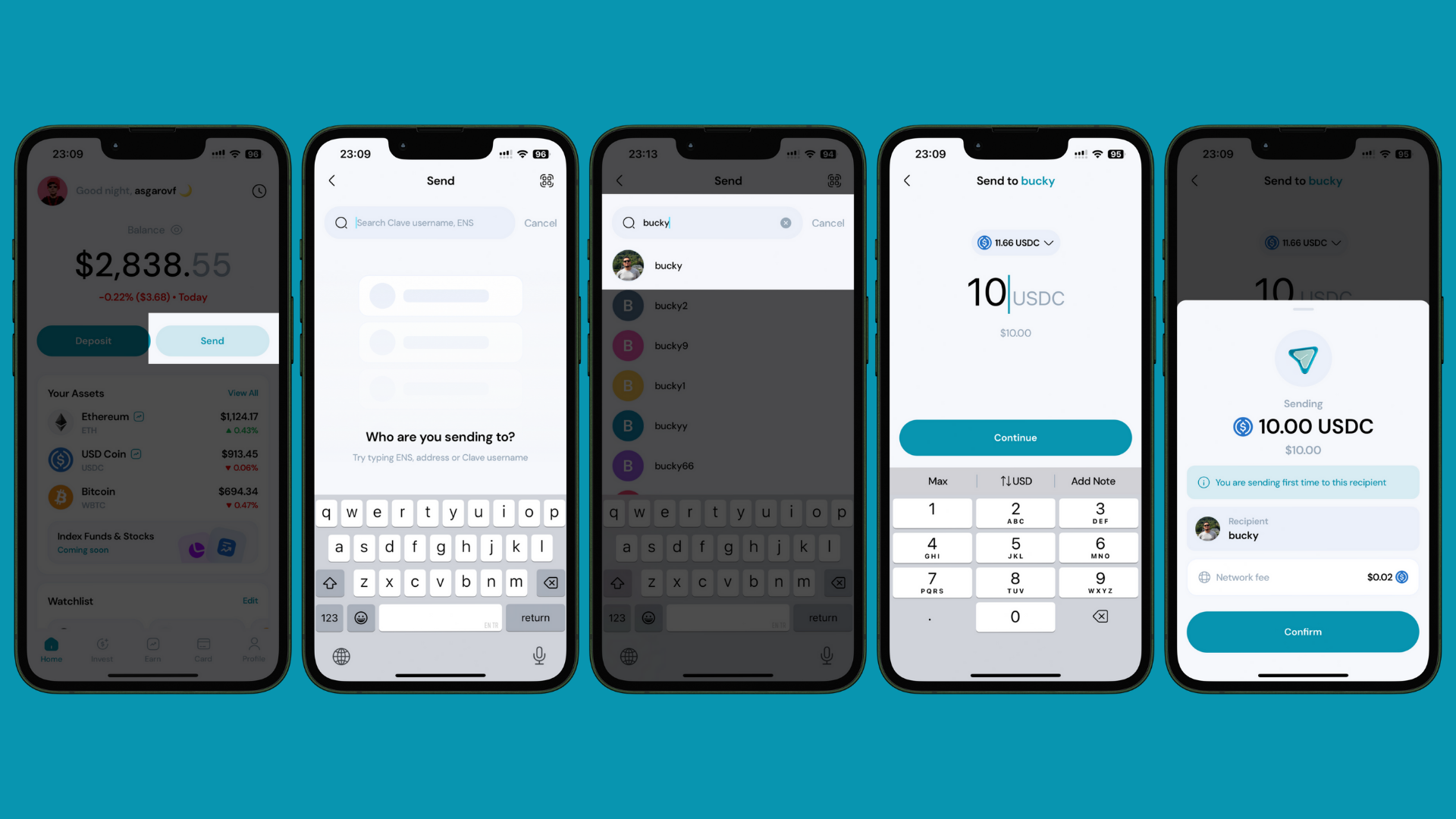
This is the most conventional way to send crypto to others. If the person you are sending crypto to already has a Clave account, you can simply write their username and send it. To send money via username, simply follow these steps:
1. Open the Clave app and click on the **Send** button.
2. **Search for the Username**: In the search bar, type the Clave username. If you don’t remember the exact username, you can search for it.
If the recipient does not use Clave, you can write their ENS and wallet address or scan the QR and send it.
3. **Select the recipient** from the search results.
4. **Enter the Amount** of cryptocurrency you wish to send.
5. **Review the Transaction Details**: recipient address, asset, and amount.
6. Tap **Confirm** to proceed with the transaction and complete biometric authentication.
 **2. Send (Withdraw) to Wallet Address**
Instead of sending to a Clave username, you can also send to a wallet address. This is useful if the recipient does not use Clave, or if
you are withdrawing your funds to a centralized exchange (CEX) or other wallet.
Withdrawals are only available on Arbitrum and Base networks. Please double check the network before withdrawing.
**2. Send (Withdraw) to Wallet Address**
Instead of sending to a Clave username, you can also send to a wallet address. This is useful if the recipient does not use Clave, or if
you are withdrawing your funds to a centralized exchange (CEX) or other wallet.
Withdrawals are only available on Arbitrum and Base networks. Please double check the network before withdrawing.